Design choices affect conversion rates by working through visitor psychology and behaviour. The reality is, most business owners focus on logos or hero images instead of the subtle web design changes that actually drive results. However, research from Forrester found that it’s a well-designed user experience that can raise website conversions up to 400%.
In this article, we’ll cover what separates conversion-focused design from basic UX and how to measure its impact using performance metrics. We’ll also discuss common UX design mistakes that stop potential customers from taking action.
Let’s find out the small adjustments that can upgrade your business performance.
What Makes Conversion-Focused Design Different From Standard UX?
Conversion-focused design prioritises actions that lead to business results, while standard UX focuses on making websites pleasant to use without necessarily driving specific behaviours. Most business owners hire UX designers to build attractive sites, but never connect design decisions to actual website conversions.
When you understand these distinctions below, every design choice serves a purpose beyond looking good.
Visual Hierarchy That Guides Without Pushing
Visual hierarchy guides the visitors to follow your intended path without feeling manipulated or pressured. To give you an idea, size and colour contrast direct eyes to important elements first, so larger headlines catch attention before body text does. Similarly, brighter buttons stand out against neutral backgrounds, which makes them impossible to miss.
Web design research shows people scan websites in predictable patterns. In general, F-pattern and Z-pattern reading naturally lead visitors toward conversion points on your page. This happens because your brain processes information in the same order every time.
So when you place your call to action where eyes naturally land, visitors find it without thinking.
Why Mobile Users Need Different Design Thinking
Did you know that over 60% of web traffic now comes from mobile devices? Yet we see most business websites still prioritise desktop design first.
Mobile users scan quickly, so they need clearer visual breaks between different sections. Plus, thumb zones and one-handed browsing change where buttons and forms should actually go. Usually, the lower third of the screen is easiest to reach with one thumb.
Which means, if your main call to action sits at the top, mobile visitors struggle to tap it (most people discover this by losing enquiries first). For that reason, touch targets need bigger hit areas than desktop click zones. Because a button that works perfectly with a mouse cursor becomes impossible to tap accurately on a phone screen.
The Psychology Behind Quiet Design Decisions
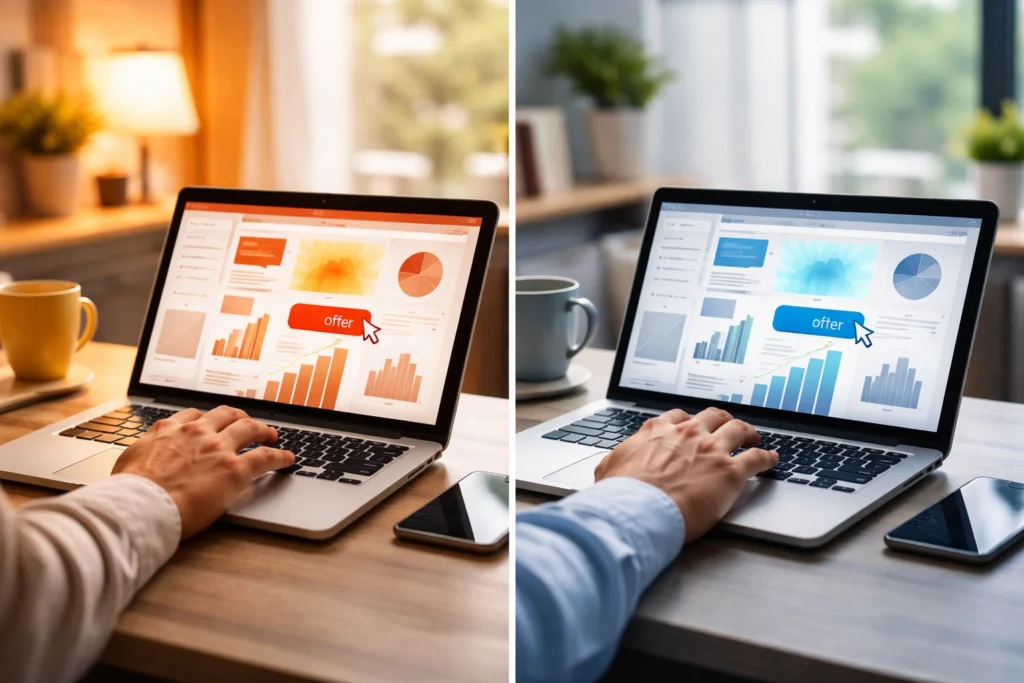
Understanding colour psychology and shape associations lets you influence visitor decisions without relying on aggressive sales tactics. In fact, colour temperature affects urgency perception, with warm colours pushing action faster than cool tones. For instance, red and orange create urgency because they trigger alertness in your brain, while blue and green feel calmer for building trust.
On a similar theory, rounded corners feel safer than sharp edges, especially for forms requesting personal information. When forms or checkout flows feel less intimidating, more people complete them because the task seems manageable instead of overwhelming.
Design Elements That Boost Conversions (Without the Hard Sell)
Visitors respond better when they don’t feel sold to, so the goal is to understand which elements move people toward action without triggering defences.
These design elements support higher conversions without drawing attention.
Landing Page White Space and Reading Flow
Most business owners think empty space is wasted space, but research shows the opposite is true for conversion rates. In reality, white space around your call to action makes it stand out without screaming for attention.
From what we’ve seen across Brisbane web design projects, line length affects reading comfort just as much as white space. Somewhere between 50 and 75 characters per line works best online because longer lines tire your eyes faster.
Forms That Don’t Scare Potential Customers Away
Each extra form field drops completion rates by roughly 10%, which accumulates when you’re chasing sign-ups. So the fewer fields you ask for, the more leads you’ll generate because people hate typing on mobile devices.
Along with that, inline validation showing errors immediately works better than post-submission failure messages. That way, when someone misspells their email and finds out right away, they fix it.
Pro Tip: Progress indicators for multi-step forms reduce friction by showing how close completion is.
How to Measure Design Impact on Conversion Rates
You can measure design impact by comparing conversion rates before and after any changes you make. Most Brisbane businesses guess at what’s working instead of tracking real data, which means they waste money on changes that don’t help.
But if you set up proper tracking, you’ll see where visitors drop off and what pushes them toward your business goals. Let’s take a look at how you can analyse your design from conversion rates.
Setting Up Tracking for Micro and Macro Conversions

Macro conversions include purchases and sign-ups, while micro conversions track smaller engagement steps.
Tracking both conversion types allows you to spot where visitors drop off, not just that they’re leaving. Google Analytics 4 events track button clicks, scroll depth, video plays, and form interactions across every main page.
What’s more, Heatmaps from Hotjar or Microsoft Clarity likewise show where visitors look and click. More importantly, session recordings reveal pain points you’d never spot otherwise because you can watch real people struggle with your checkout flow.
Running Tests That Show Real Lead Generation Results
A/B tests need a minimum of 100 conversions per variation to produce statistically reliable data. We suggest testing one design element at a time because changing multiple things makes results impossible to interpret.
Run these tests for full business cycles, usually 2 to 4 weeks minimum (accounting for traffic variations). Because different versions of your landing page might perform differently on weekends versus weekdays.
Note: Look for performance indicators like click-through rates and bounce rate that provide insights into what’s working.
Common Design Mistakes That Kill Conversions
Almost all web design problems come from trying too hard to impress visitors instead of helping them take action. These mistakes compound over time and quietly drain your conversion rates without obvious warning signs.
Let’s look at what’s costing you leads.
When “More Information” Actually Means Less Action
In our experience with hundreds of small business websites, too many choices paralyse decision-making. To back this up, psychology research shows that more or less 8 options work best because anything more overwhelms visitors.
For instance, walls of text before CTAs give visitors too many reasons to doubt and leave instead of taking your desired action. Explaining every feature detail works against visitors who want simple, fast solutions to their problems.
When you focus on benefits instead of features, conversion rates improve because people care about results, not specifications.
Loading Speeds Nobody Talks About
Images over 200KB slow mobile loading enough to lose impatient visitors within 3 seconds (three seconds feels like nothing until you’re the one waiting). In fact, 100 milliseconds of page delay costs you 7% of potential conversions.
Brisbane businesses competing for mobile users need a responsive design that adapts to screen sizes without slowing down. As a solution, lazy loading content below the fold keeps initial page speed fast without sacrificing content quality.

Trust Signals That Work for Higher Conversion Rates
Security badges placed near payment fields reduce cart abandonment more effectively than testimonials alone. Along with that, real photos of your team or Brisbane location build more trust than stock images (clients ask about this last, but it should come first).
Customer reviews showing dates and full names also outperform generic anonymous star ratings because social proof works best when it feels real and verifiable.
Start Small, Test Everything
Design choices affect conversion rates in ways most visitors never consciously notice. However, you don’t need a complete website overhaul to see results, so start with one element and build from there.
Pick one design element to test based on your traffic patterns and business goals. At the same time, document your results to build knowledge about what works for your audience. These small improvements compound over time, as a 2% monthly lift becomes a 24% yearly gain.
At Graphedge, we’ve seen Brisbane businesses improve their conversion-focused design by addressing these factors systematically rather than chasing trendy redesigns. If you’re ready to audit your website’s conversion potential, visit our website to get a detailed breakdown and actionable recommendations.